 FS-Skia-UI
Rich Text
- Category: display
- Purpose: Skia-specific rich text display with measurement, clipping, effects, diagnostics, and accessibility metadata.
- API reference: FS.Skia.UI.Controls.RichText
← Back to the controls catalog
Overview
The Rich Text control is a display-category control in the FS.Skia.UI control suite.
Skia-specific rich text display with measurement, clipping, effects, diagnostics, and accessibility metadata. It requires the runs attribute. It raises no events (it is a non-interactive, display-only control). Its accessibility role is StaticText.
Build it through the FS.Skia.UI.Controls.RichText module — the typed Props/MVU front door is the
preferred authoring surface (see
Typed control front door). Every
attribute is owned by the model; the control renders against the active Theme,
so its colours, sizing, and density follow the design tokens (see
Controls in the Spec Kit workflow).
Usage example
A runnable example that exercises this control lives in the controls gallery
sample, samples/ControlsGallery/Program.fs. It is compiled as part of the build,
so the example stays in lock-step with the public API.
Preview
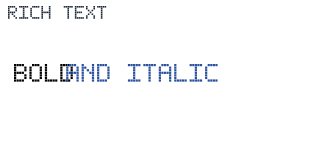
A deterministic render-only preview of Rich Text (320×160), produced through the
render-only evidence path (Widget.render → SkiaViewer.captureScreenshotEvidence,
ViewerRenderTargetPng) and validated decodable / non-1×1 / non-trivial via
Testing.readPngArtifact. It shows the control rendered against the default
DesignTokens.Light theme.